
What Is Learning Management System (LMS)? – Guide, Types & Examples


- A Learning Management System (LMS) is a centralized platform used to manage, deliver, and track employee learning in a structured and measurable way.
- Common LMS examples include Mekari Talenta, SAP SuccessFactors Learning, Cornerstone OnDemand, Docebo, and Moodle.
In many organizations, learning is still managed inconsistently, dependent on individual managers, disconnected from performance, and difficult to track at scale.
As teams grow, roles evolve, and operations become more complex, this approach quickly creates gaps in capability and alignment. The challenge is about ensuring that learning is structured, measurable, and directly linked to workforce needs.
Without a system in place, even well-designed development programs struggle to sustain impact over time.
This article will provide a comprehensive guide to learning management systems, covering what an LMS is, how it works, its benefits, key components, challenges, and how to choose the right one.
What Is a Learning Management System?
A Learning Management System (LMS) is a centralized platform used to plan, deliver, manage, and measure employee learning and development in a structured and consistent way.
It goes beyond simply storing training materials. An LMS ensures that learning is standardized across the organization, assigned based on roles or competencies, and tracked through clear data and reporting.
This allows organizations to maintain consistency in onboarding, compliance training, and capability development, regardless of team or location.
More importantly, an LMS connects learning activities with performance and business needs. It provides visibility into training completion, skill gaps, and development progress, enabling more informed decisions around talent development and alignment with KPI performance.
As a result, learning becomes a managed, measurable function that supports overall workforce effectiveness, rather than a fragmented or one-time initiative.
What Are the Benefits & Advantages of an LMS?
A Learning Management System brings structure and consistency into how learning is delivered, while also making it more efficient and measurable.
Instead of fragmented or one-time training initiatives, learning becomes continuous, trackable, and aligned with capability needs.
The advantages are typically reflected in how quickly employees learn, how much it costs to train them, and how clearly the impact can be measured.
1. Faster Learning & Higher Efficiency
An LMS allows employees to access learning materials anytime, reducing dependency on scheduled sessions and minimizing downtime from daily work.
This flexibility enables employees to learn at their own pace while still following structured development paths. It also shortens the time required to reach competency, especially for onboarding and role-specific training.
2. Lower Training Costs & Operational Overhead
Traditional training often involves significant logistical costs, including travel, instructors, venues, and printed materials.
An LMS centralizes all learning activities into one platform, eliminating many of these recurring expenses. It also reduces administrative workload through automation of enrollment, tracking, and reporting.
Read also: Calculating Return on Training Investment (ROTI) and Strategies
3. Measurable Learning Impact Through Data
One of the key advantages of an LMS is the ability to track and analyze learning activities in detail.
Organizations can monitor completion rates, assessment results, and engagement levels, creating clear visibility into learning effectiveness. This data makes it possible to identify skill gaps and refine development strategies more precisely.
What Is the Main Function of an LMS?
A Learning Management System is often understood as a platform to deliver training, but its main function goes much deeper than that.
At a structural level, an LMS acts as the system that organizes how capability is built, maintained, and monitored across the workforce.
It ensures that learning is not random or reactive, but intentionally designed, systematically deployed, and continuously evaluated.
Over time, the role of an LMS evolves from a training tool into a control mechanism for workforce readiness, such as:
1. Structuring and Standardizing Workforce Capability
One of the core functions of an LMS is to bring structure into how skills and knowledge are developed. Without this, learning tends to be inconsistent, heavily dependent on individual managers, and difficult to scale.
An LMS allows organizations to define what “competent” looks like for each role, then translate that into structured learning paths.
This ensures that onboarding, technical training, and even leadership development follow a consistent standard. It also reduces variability in performance that often comes from uneven training quality across teams or locations.
2. Translating Business Needs into Learning Programs
An LMS functions as the bridge between business priorities and actual development execution. It allows organizations to respond quickly to changes, whether that’s expansion, new regulations, or shifts in strategy, by deploying targeted learning at scale.
Instead of redesigning training manually each time, learning programs can be updated, reassigned, and rolled out systematically.
This makes capability development more responsive and aligned with what the business actually needs, rather than relying on generic or outdated training content.
3. Creating Visibility and Accountability in Learning
Another key function is making learning visible and accountable. Without a system, it is difficult to know who has completed training, who is behind, and whether learning is actually happening.
An LMS tracks participation, completion, and performance, giving both HR and managers clear visibility into development progress.
This also shifts learning from being optional to something that is monitored and expected. Managers can no longer assume development is happening because they can see measure, and act on it.
4. Managing Compliance and Reducing Organizational Risk
One function that is often underestimated is the LMS’s role in compliance management. Many industries require mandatory training related to safety, ethics, or regulatory standards.
An LMS ensures that required training is assigned, completed, and documented properly. It provides audit trails and certification tracking, which are critical in reducing legal and operational risks.
Without this level of control, organizations are far more exposed to compliance failures that are difficult to detect until it’s too late.
5. Enabling Data-Driven Talent Development Decisions
Beyond delivery and tracking, an LMS serves as a source of insight. It generates data that can be used to identify skill gaps, evaluate program effectiveness, and inform broader talent strategies.
Patterns in learning behavior often reveal deeper issues—such as capability gaps in certain functions, or misalignment between training and actual performance needs, which can also be validated through 360-degree feedback.
This allows development efforts to be refined continuously, rather than relying on assumptions or one-time evaluations.
6. Supporting Long-Term Workforce Readiness
A less obvious but critical function of an LMS is maintaining workforce readiness over time. Skills are not static, and without continuous reinforcement, capability declines.
An LMS supports ongoing learning through refreshers, upskilling programs, and evolving learning paths tied to career progression.
This ensures that employees do not just reach a certain level of competence, but sustain and expand it as roles and expectations change.
What Type of Company Uses an LMS?
An LMS is not limited to one specific industry or business model. Any organization that needs to develop people in a structured, consistent, and scalable way will eventually rely on an LMS.
The difference lies in how it is used because each type of company typically leverages an LMS to solve different operational and capability challenges.
1. Manufacturing & Operational-Heavy Companies
Companies with large operational workforces use an LMS primarily to standardize technical training, safety protocols, and compliance requirements.
In these environments, consistency is critical. An LMS ensures that machine operators, technicians, and frontline workers follow the same procedures regardless of location or shift.
It is also used to track certifications, safety training completion, and recurring mandatory programs. Without this structure, the risk of operational errors and safety incidents increases significantly.
2. Service-Based & Customer-Facing Businesses
Organizations that rely heavily on customer interaction use an LMS to maintain service quality and consistency.
Training typically focuses on customer handling, product knowledge, communication standards, and service protocols.
An LMS helps ensure that every employee, whether in sales, support, or frontline service, delivers a consistent experience.
It is also commonly used for onboarding new hires quickly, especially in environments with high hiring volume or employee turnover.
3. Professional Services & Knowledge-Driven Organizations
In companies where the primary asset is expertise, an LMS is used to continuously develop and update employee knowledge.
Learning programs are often centered around certifications, industry updates, and advanced skill development. The LMS helps structure ongoing learning so that employees remain relevant and competitive in their field. It also supports knowledge sharing, making internal expertise more accessible across teams.
4. Technology & Product-Focused Companies
Companies in fast-evolving industries use an LMS to keep up with rapid changes in tools, systems, and product knowledge.
Training is typically focused on upskilling and reskilling, especially as technologies evolve quickly.
An LMS allows new knowledge, such as product updates or system changes, to be distributed immediately and consistently. It also supports cross-functional learning, which is important in environments where roles often overlap.
5. Multi-Entity or Multi-Location Organizations
Organizations operating across multiple entities, regions, or business units rely on an LMS to maintain alignment.
The LMS ensures that policies, standards, and training programs are implemented consistently across all locations. At the same time, it allows for localized adaptations when needed, without losing overall control.
This balance between standardization and flexibility is critical when managing diverse teams across different operational contexts.
Read also: Multi Location Workforce Management: A Guide for Multi-Branch Teams
6. Regulated Industries (Finance, Healthcare, etc.)
Organizations operating under strict regulations use an LMS primarily for compliance management and audit readiness.
Training in these environments is not optional. It is mandatory and often time-bound.
An LMS ensures that all required certifications, regulatory training, and policy updates are completed and properly documented. It also provides audit trails, which are essential for demonstrating compliance and reducing legal risk.
How Does a Learning Management System Work?
A Learning Management System (LMS) works by turning learning into a structured, repeatable process that runs automatically once it is set up.
Instead of coordinating training manually, the system manages how learning is assigned, delivered, tracked, and evaluated in one continuous flow.
To make it simple, an LMS works like a cycle: you define what needs to be learned, the system distributes it, employees complete it, and the results are tracked and used to improve the next cycle.
1. Learning Structure Is Set Up First
Everything starts from defining what employees need to learn. Courses are created, materials are uploaded, and then organized into structured learning paths based on roles or requirements.
Once this structure is in place, it becomes reusable. For example, every new hire in a certain role can automatically follow the same onboarding path without HR needing to reassign training manually each time.
2. Training Is Assigned Automatically
After the structure is defined, the LMS distributes training to employees based on rules. Assignments are usually triggered by factors like job role, department, location, or whether someone is a new joiner.
Employees don’t need to be told manually, since they receive notifications and can see all assigned learning directly in their dashboard. This ensures consistency and removes the risk of someone being missed.
3. Employees Access and Complete Learning
Employees log into the LMS and complete their assigned training through the platform. The learning format can vary, including videos, reading materials, interactive modules, or assessments. However, everything is accessed in one place.
Because it is system-based, learning is flexible. Employees can complete it at their own pace while still following a structured path that has already been defined.
4. The System Tracks Progress Automatically
As soon as learning begins, the LMS records all activity in real time. Completion status, time spent, and assessment results are captured without any manual input.
This creates a reliable record of learning progress across the organization. It also ensures that required training—especially compliance-related—is properly documented.
5. Managers and HR Monitor and Follow Up
The system provides visibility through dashboards and reports. Managers and HR can see who has completed training, who is behind, and where potential gaps exist.
This allows targeted follow-up. Instead of chasing everyone manually, attention can be focused only on areas that actually need intervention.
6. Data Is Used to Improve Learning
The final step is where the system becomes more than just a delivery tool. The data collected from learning activities is used to evaluate effectiveness and refine future programs.
Over time, it becomes clear which training works, which doesn’t, and where capability gaps are still present. Learning can then be adjusted accordingly, making the entire process more accurate and aligned with actual needs.
Key Components & Features of a Learning Management System
LMS made up of interconnected components that control how learning is created, distributed, tracked, and continuously improved.
In a more mature setup, these components do not operate separately. They work as one flow: content is structured, automatically assigned, completed by employees, tracked by the system, and then used to inform decisions. That is what turns an LMS from a “training tool” into a capability management system.
1. Learning Content & Course Structure
At the foundation of any LMS is the content layer. This is where all learning materials are created, stored, and organized. It includes videos, documents, modules, and assessments that are structured into courses and then grouped into learning paths.
For example, platforms like Mekari Talenta allow various learning formats—such as videos, documents, and interactive modules—to be managed within a single centralized system, as shown below:
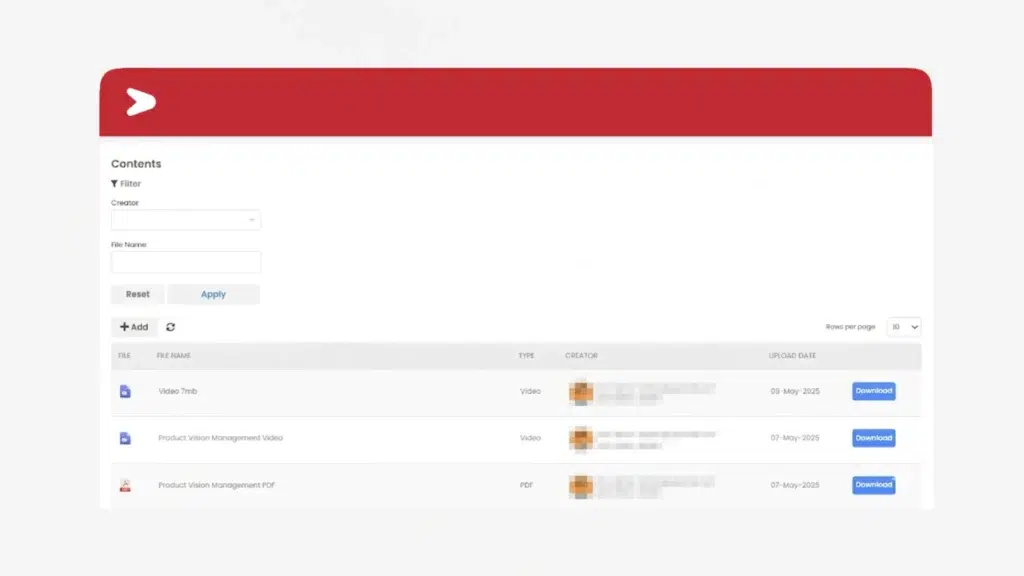
The real function here is not just storage, but control and consistency. Every employee accesses the same standardized materials, updates can be deployed instantly, and outdated content can be replaced without confusion. Over time, this becomes the single source of truth for how knowledge and skills are defined across roles.
2. Learning Paths & Assignment Logic (Automation Engine)
This is where learning becomes structured and scalable. Instead of assigning training manually, the LMS uses predefined rules to distribute learning automatically.
Courses are bundled into learning paths based on roles, departments, or career stages. These paths are then triggered by employee data, such as when someone joins, changes roles, or moves teams. This ensures that learning is always relevant and timely, without relying on manual coordination.
In practice, this component is what removes inconsistency. Everyone in the same role follows the same baseline development journey.
3. User & Role Management
This component defines how people interact with the system. Employees are grouped based on organizational structure, such as department, role, or location, and each group can have different learning requirements.
It also controls access and permissions. For example, HR may have full system visibility, while managers only see their team’s data.
This ensures that learning is distributed in a targeted way while maintaining proper control over data and system usage.
4. Assessment & Certification System
Learning without validation has limited value. This component ensures that employees not only complete training, but also understand and can apply it.
Assessments such as quizzes or tests are embedded into courses, allowing measurement of comprehension. Certifications can then be issued upon completion, often with expiration periods that require renewal.
This becomes especially critical in roles where compliance, safety, or professional standards must be formally validated and documented.
5. Tracking, Reporting & Analytics Layer
Every action within the LMS is captured and stored as data. This component transforms learning activity into measurable insights.
The system tracks completion rates, progress, assessment scores, and engagement levels, and presents them through dashboards and reports. This provides clear visibility into who is learning, where gaps exist, and how effective programs are.
More importantly, this layer enables decision-making. It allows learning to be adjusted based on actual data, rather than assumptions.
6. Notification & Communication System
To ensure learning actually happens, the LMS includes automated communication mechanisms.
Employees are notified when training is assigned, when deadlines are approaching, or when certifications are about to expire.
Managers are also alerted if their team members fall behind. This reduces reliance on manual follow-ups and creates a built-in accountability system that keeps learning on track.
7. Integration Layer (HR & Performance Systems)
A standalone LMS has limited impact. This component connects the LMS with other systems, especially HRIS and performance management system.
Through integration, employee data automatically flows into the LMS, triggering learning assignments based on real-time changes such as hiring, promotions, or transfers.
At the same time, learning data can feed into performance reviews and development planning, ensuring that learning is directly tied to talent management.
8. Learner Interface & Experience Layer
This is the part of the LMS that employees interact with daily. It includes dashboards where users can view assigned training, track progress, and access learning materials.
A well-designed interface makes learning intuitive and accessible, especially when combined with mobile access. This is critical because even the most well-structured system will fail if employees find it difficult or inconvenient to use.
Challenges of Implementing and Maintaining an LMS
On paper, an LMS looks straightforward, from set it up, upload content, assign training, and everything runs automatically.
In reality, most challenges don’t come from the system itself, but from how it is implemented, adopted, and maintained over time.
The gap between “having an LMS” and “making it actually work” is where most issues happen.
1. Low Adoption from Employees and Managers
One of the most common issues is that people simply don’t use the system as intended. Employees may see learning as an additional task, while managers often don’t actively follow up on their team’s progress.
This usually happens when learning is not clearly tied to performance or day-to-day work. If employees don’t see immediate relevance, completion becomes a checkbox activity—or worse, ignored entirely, which is often reflected later in exit interview feedback.
Without strong manager involvement, even the best-designed LMS will struggle to gain traction.
2. Content Becomes Outdated Very Quickly
Many organizations invest heavily at the beginning—creating courses, uploading materials, building learning paths—but fail to maintain them.
Over time, content becomes outdated, especially in roles where processes, tools, or regulations change frequently.
When employees realize that materials are no longer relevant, trust in the system drops, and learning becomes disconnected from Individual Development Plans (IDP). At that point, even updated content tends to be ignored because the LMS is already perceived as unreliable.
3. Overcomplicating the Learning Structure
Another real issue is trying to design everything perfectly from the start. Learning paths become too complex, too detailed, and too difficult to manage.
This often leads to:
- Confusing user experience
- Overlapping or redundant courses
- Difficulty in updating or scaling programs
Instead of helping, the LMS becomes rigid and hard to adapt. In practice, simpler structures with room to evolve tend to work much better.
4. Lack of Integration with Other HR Processes
An LMS that stands alone rarely delivers full value. When it is not connected to performance management, onboarding, or workforce planning, learning becomes disconnected from actual business needs.
For example, employees complete training, but it is never reflected in performance reviews or development discussions. As a result, learning feels isolated and less meaningful, reducing both engagement and impact.
5. Poor Data Utilization
Most LMS platforms provide extensive data, but in reality, it is often underutilized.
Reports are generated, but not analyzed deeply. Completion rates are tracked, but not linked to performance or capability gaps.
This turns the LMS into a tracking tool rather than a decision-making tool. The real challenge is not collecting data. Instead, it’s knowing how to use it to improve learning strategy.
6. Resistance to Change in Learning Culture
Implementing an LMS often requires a shift from informal or manager-led training to a more structured approach. This can create resistance, especially in teams that are used to more flexible or traditional methods.
Some employees prefer face-to-face learning, while some managers feel they are losing control over how they develop their teams. Without proper alignment and communication, the LMS can be seen as a system that adds control rather than value.
7. Ongoing Maintenance Is Underestimated
Many assume that once an LMS is implemented, the work is mostly done. In reality, maintaining it is an ongoing effort.
This includes updating content, adjusting learning paths, monitoring completion, analyzing data, and continuously aligning learning with changing needs. Without dedicated ownership, the system slowly becomes inactive or irrelevant.
8. Balancing Standardization and Flexibility
A constant challenge is finding the right balance between standardizing learning and allowing flexibility for different teams or functions.
Too much standardization can make learning feel generic and less relevant. Too much flexibility can lead to inconsistency and loss of control. Managing this balance requires continuous adjustment, especially in organizations with diverse roles and needs.
How Do I Choose the Right Learning Management System?
Choosing an LMS is less about finding the most feature-rich platform, and more about selecting a system that can realistically be adopted, maintained, and aligned with how learning actually happens in your organization.
Most mistakes happen when the decision is driven by features or demos, without considering real operational challenges—like low adoption, outdated content, or lack of integration. The right LMS is the one that reduces these risks, not adds to them.
1. Choose Based on How Learning Actually Happens (Not Ideal Scenarios)
A common mistake is selecting an LMS based on how learning should work, rather than how it currently works.
If employees are mostly operational or not desk-based, a system that depends heavily on long desktop sessions will struggle.
If managers are not actively involved in development, choosing a system that requires heavy manager input will likely fail.
The right LMS should fit into existing behavior first, then gradually improve it. Adoption is always more important than sophistication.
2. Prioritize Simplicity Over Feature Overload
Many platforms offer extensive features, but more does not always mean better. Overly complex systems often lead to low usage, confusion, and heavy administrative effort.
A good LMS should make it easy to:
- Assign learning
- Access content
- Track progress
If basic actions require too many steps or training just to use the system, it will not scale well. In practice, simpler systems with strong core functionality tend to perform better over time than complex ones that are underutilized.
3. Evaluate Content Management and Update Flexibility
One of the biggest real-world issues is outdated content. Because of this, the LMS must make it easy to update, replace, and manage learning materials.
Look for systems that allow quick content edits, version control, and centralized updates. If updating content feels complicated or requires technical support every time, the system will quickly become irrelevant.
4. Ensure Strong Automation for Assignment
Manual assignment is one of the fastest ways to break a learning system. The LMS should be able to automatically assign training based on employee data such as role, department, or tenure.
This ensures consistency and removes dependency on HR or managers to distribute learning manually. Without strong automation, even a well-designed learning structure will not be executed properly.
5. Check Integration with HR and Performance Systems
An LMS that is not connected to other systems will operate in isolation.
The right system should integrate with HRIS or employee databases so that learning assignments are triggered automatically when there are changes, such as new hires or role movements. It should also allow learning data to be used in performance or development discussions.
This connection is what makes learning relevant, rather than an isolated activity.
6. Look at Reporting That Supports Decisions (Not Just Data)
Most LMS platforms offer reporting, but not all reports are useful.
The focus should be on whether the system helps answer real questions, such as:
- Who is not meeting learning requirements?
- Where are capability gaps concentrated?
- Which programs are actually effective?
If the system only provides raw data without clear insights, it will not support better decision-making.
7. Consider Long-Term Maintenance, Not Just Implementation
Many LMS implementations fail not at launch, but after a few months. Choosing an LMS should include thinking about who will manage it long-term and how sustainable that effort is.
The system should be easy to maintain, from updating content, adjusting learning paths, and monitoring progress should not require heavy effort or external support. If maintenance is too complex, the system will gradually be neglected.
8. Evaluate User Experience from an Employee Perspective
No matter how strong the backend is, the LMS will fail if employees find it difficult or inconvenient to use.
The interface should be intuitive, easy to navigate, and accessible across devices. Employees should be able to quickly see what they need to do without confusion.
A good user experience directly impacts adoption, which ultimately determines whether the LMS delivers value or not.
Learning Management System Examples
There are many LMS platforms available, but in practice, each tends to position itself slightly differently depending on how learning is expected to connect with HR processes, content delivery, or scalability needs.
Below are five commonly used platforms, with a focus on how they are typically used in real-world scenarios.
1. Mekari Talenta LMS
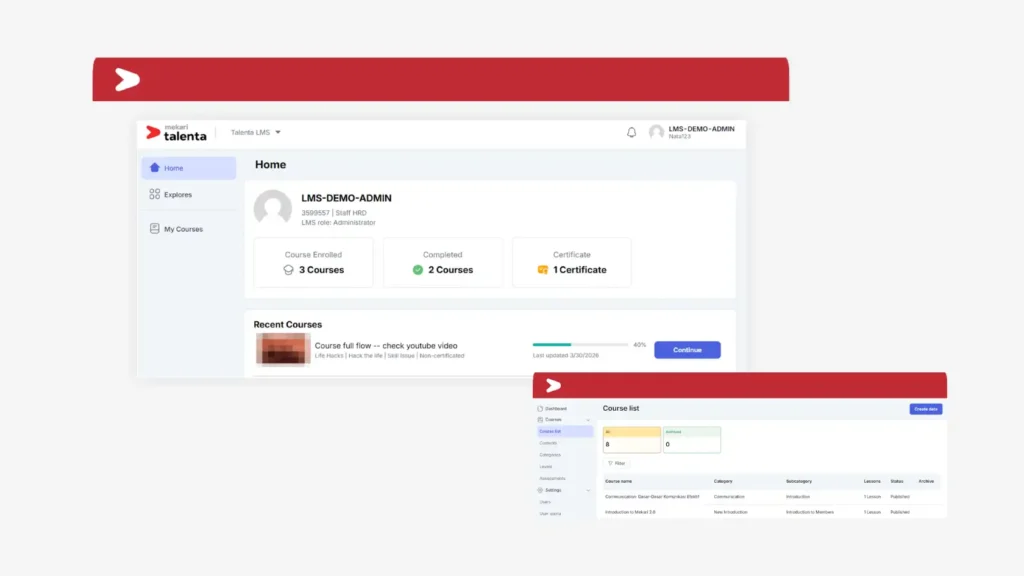
Talenta LMS is a learning management feature within Mekari Talenta, an AI-centric, cloud-based Human Capital Management (HCM) system.
Because it is integrated within the broader HCM platform, learning is directly connected with other HR processes such as performance management, employee development, and strategic workforce planning. This allows organizations to manage training as part of a unified system, rather than as a separate tool.
This type of setup is particularly effective when the goal is to ensure learning is aligned with performance and talent development strategy, rather than operating separately. It also reduces manual work, since employee data automatically drives learning assignments and tracking.
Key features of Mekari Talenta LMS:
| Feature | Description |
|---|---|
| Centralized Training Management | Manage all training programs, learning materials, and course assignments within one centralized platform for better consistency and control. |
| Flexible Content Delivery | Deliver training in various formats such as videos, PDFs, presentations, and interactive modules to suit different learning preferences. |
| Real-Time Progress Tracking | Monitor employee participation, completion status, and learning progress in real time across teams and departments. |
| Assessment & Certification | Conduct evaluations, measure learning outcomes, and automatically issue certifications upon course completion. |
| HCM Integration | Connect learning data with performance management, employee development, and workforce planning for better alignment. |
| Compliance & Audit Support | Maintain complete training records and certification history to support compliance requirements and audit readiness. |
2. SAP SuccessFactors Learning
SAP SuccessFactors Learning is commonly used in environments where learning needs to be tightly controlled and standardized across multiple business units or regions.
It is often leveraged for compliance-heavy training, certification tracking, and large-scale onboarding programs. One of its strengths is handling complex organizational structures, where different roles require different training paths but still need to be centrally monitored.
In practice, this platform is usually chosen when consistency, auditability, and structured development programs are critical, especially when learning must follow strict governance.
3. Cornerstone OnDemand
Cornerstone is widely used as a comprehensive talent management software, with LMS as one of its core components.
It is typically used to connect learning with performance management and succession planning. For example, development plans can be directly linked to performance reviews, and employees can be assigned learning based on competency gaps.
What stands out in real usage is its focus on long-term talent development. It is often used not just to deliver training, but to build structured career development pathways and leadership pipelines.
4. Docebo
Docebo is known for its flexibility and strong user experience, making it easier to drive adoption compared to more rigid systems.
It is often used in environments where learning needs to be engaging and scalable, such as training distributed teams or supporting continuous upskilling.
The platform supports various content formats and social learning features, which help make learning more interactive.
In practice, Docebo is commonly chosen when the priority is improving engagement and making learning more accessible, rather than focusing purely on compliance or rigid structures.
5. Moodle
Moodle is an open-source LMS that is widely used due to its flexibility and customization capabilities.
It is often implemented in organizations that want full control over how their LMS is configured, including content structure, user experience, and integrations.
However, it typically requires more internal resources to manage, maintain, and customize compared to ready-to-use platforms.
In real-world usage, Moodle works well when there is a need for customization and internal control, but it requires strong ownership to ensure it remains structured and up to date.
Conclusion
A Learning Management System functions as a structured system that ensures learning is consistent, measurable, and aligned with workforce needs.
When implemented properly, it connects development activities with performance, reduces operational inefficiencies, and provides clear visibility into capability gaps across the organization. Its impact depends on how well it is adopted, maintained, and integrated into daily operations.
Selecting a system that fits real learning needs and managing it consistently over time will determine whether learning delivers measurable value or remains fragmented.
Reference:
Frequently Asked Questions (FAQs)
What is the difference between LMS and eLearning platforms?
What is the difference between LMS and eLearning platforms?
An LMS is a system used to manage and track learning, while eLearning platforms typically focus on delivering content. In other words, eLearning is the content layer, whereas LMS is the system that organizes, assigns, and measures that content. Many LMS platforms can host eLearning materials, but not all eLearning platforms provide full LMS capabilities like reporting or automation. The distinction becomes important when scaling learning across an organization.
How long does it take to implement an LMS?
How long does it take to implement an LMS?
Implementation timelines vary depending on system complexity and organizational readiness. A basic setup can take a few weeks, but a fully integrated and structured LMS setup may take several months. The biggest factor is not the system itself, but how well learning paths, content, and processes are prepared. Without proper planning, even a fast implementation can lead to poor adoption later.
Do small or growing companies need an LMS?
Do small or growing companies need an LMS?
Yes, but the level of complexity should match the organization’s needs. Smaller teams often benefit from simpler LMS setups that focus on onboarding and basic training standardization. As the organization grows, the LMS can evolve to support more structured development and tracking. Implementing early can actually prevent inconsistency as the workforce expands.
Can an LMS replace traditional training completely?
Can an LMS replace traditional training completely?
Not entirely. While an LMS can handle most structured and repeatable training, some types of learning—such as leadership coaching or hands-on skill development—still benefit from direct interaction. The most effective approach is usually a blended model, where the LMS supports and scales learning, while in-person methods are used for deeper engagement. The LMS acts as the backbone, not a full replacement.
Who is responsible for managing an LMS internally?
Who is responsible for managing an LMS internally?
Typically, HR or Learning & Development teams take ownership of the LMS. However, effective management also involves collaboration with managers and sometimes IT, especially for integration and data flow. Without clear ownership, the system often becomes outdated or underutilized. Long-term success depends on having dedicated responsibility for both content and system management.


