
We Gave 57 Companies Free Access to Live Tracking. Most of It Didn’t Work and Here’s Why

- Live tracking failures happen because employees frequently bypass the system by denying smartphone permissions or disabling their hardware GPS.
- Successful adoption requires treating the rollout as a human change management initiative rather than a top-down software deployment.
One company assigned Live Tracking to 10 employees, but only 1 was ever tracked. The other 9 had the app installed, the feature enabled, and showed up to work every day. They just tapped “Deny” on a single permission prompt.
Weeks later, the HR manager opened the route dashboard and saw perfectly straight lines cutting blindly across the city map. At first glance, she thought the entire tracking system was fundamentally broken. But that isn’t the case.
How Live Tracking actually helps companies and why it mostly didn’t work in our experiment? Here’s why.
Experiment Background
A few months earlier, we had just launched Mekari Talenta Live Tracking and opened an exclusive free trial program for 57 companies across diverse industries, including:
- Manufacturing
- Retail
- Financial services
- Logistics
- Professional services
The main idea is simple: we want to let real operational teams integrate the feature into their workflows, then study exactly what happened on the ground before scaling it further.
At first, we assumed that GPS tracking failure would be a technical problem. The reality was that it was almost entirely employees’ behavioral and UX problems.
We expected technical feedback focused on raw GPS accuracy, dashboard visibility, or heavy battery drain. Instead, the most debilitating bottlenecks occurred before the tracking even started.
Across our extensive user interviews, we found a counterintuitive reality: the hardest part of live tracking wasn’t building the map or perfecting the dashboard. It was getting real people to actually keep the system running consistently. How does that actually work? Let us explain it a bit further.
The Experiment
To capture the realities of field operations, we held the trial across 57 companies divided into three distinct groups, granting each group a two-month window to try the feature.
The participating businesses consist of a wide range of industries, including manufacturing, retail, financial services, trading, hospitality, professional services, and the real sector. In terms of scale, the program is split across 7 enterprises, 8 large, 24 medium, 10 micro, and 6 small companies.
Every organization assigned the live tracking tool directly to the employees’ smartphone, ranging from logistics drivers and field sales teams to field operations and project staff.
Previously, these teams relied on fragmented solutions like temporary WhatsApp live location shares, retroactive Google Maps Timeline screenshots, or manual email reports.
To understand the underlying data, we selected eight representative companies for in-depth, qualitative interviews after their trials concluded.
The result exposed a much more fundamental barrier: the massive structural gap between feature availability and actual operational adoption.
Read more: Organizations Are Investing More in Internal Talent Mobility Frameworks — Here’s Why and How
What We Expected vs. What We Found
We assumed that a healthy dashboard status meant data was flowing accurately. The reality was that a “healthy” status often masked an entirely disconnected field employee.
Our envisioned operational sequence was cleanly linear: HR configures the tracking rules, assigns the target employees, the administrative dashboard illuminates with an “active” status indicator, and real-time geographical data streams smoothly into the database.
The actual lifecycle on the ground was far more unpredictable. A field employee would open the app, encounter the standard smartphone permission prompt, and instinctively tap “Deny” or “Allow Only This Once.”
Back at headquarters, the HR dashboard still proudly displayed the employee as “Active” under the tracked pool. Trusting the visual indicator, HR assumed the mechanism was running perfectly, while weeks passed with the system capturing empty payloads or rendering glitched, straight-line route metrics.
For example, one field supervisor noticed erratic path mapping and filed an urgent support ticket, convinced our tracking engine was suffering from a critical codebase bug.
The real issue had nothing to do with the software: sales representatives were granting location access at clock-in, then turning their phone’s hardware GPS completely off immediately afterward.
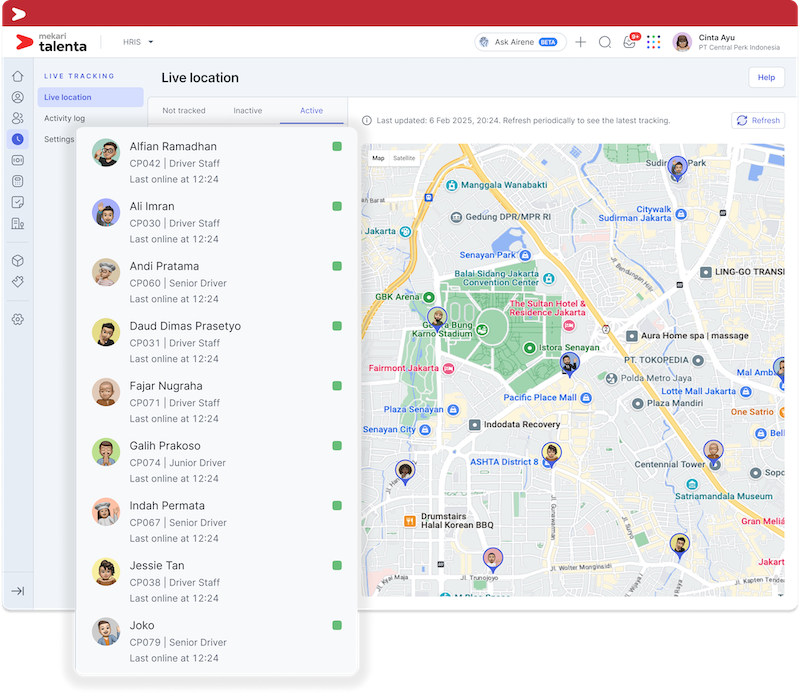
Because the application’s initial check registered them as compliant, the main dashboard labeled them as “tracked,” while the route map desperately tried to connect the data gaps with blind, straight lines.
This emerged as the most common failure pattern across our entire 57-company dataset and easily the most invisible one.
Two Types of ‘Doesn’t Work’
When we analyzed why live tracking stalled across dozens of operations, we found that the obstacles weren’t software architecture flaws. Instead, the data split cleanly into two distinct behavioral failure modes that rendered the system blind:
1. Permission Failure
The first breakdown happened at the device level before any tracking could begin. When an employee tapped “Deny” on the operating system’s location prompt, it severed the data pipeline completely, leaving HR entirely unaware that the system was offline.
A major catalyst for this was the prompt fatigue felt by users. When employees selected “Allow Once” to get past initial clock-in screens, the app was forced to re-request permission every single time it woke up.
This constant looping quickly fatigued users, particularly older and less tech-comfortable employees, into permanently denying access just to stop the interruptions.
At one distribution company, a routine morning onboarding session stalled for fifteen minutes because field workers repeatedly selected “Allow Once” instead of “Always Allow.”
Every time they minimized and reopened the application, the exact same system prompt flashed back on their screens. Frustrated by the digital loop, several workers gave up and tapped “Deny” permanently, closing off the data stream before their shift even started.
To prevent this, companies must look closely at how their general HRIS mobile app features handle background permissions during the initial download to minimize user touchpoints.
2. Behavioral Bypass
The second failure mode was much more tactical. Here, employees would comply with rules at the physical office by allowing location tracking during morning clock-in, only to immediately disable their phone’s hardware GPS once out of sight.
The route map would then draw a useless, flat, straight line from the primary office checkpoint directly to the last known coordinate captured hours later.
This was highly insidious because the main dashboard showed a green, active status, meaning HR rarely noticed the data decay unless they manually audited individual route quality.
Interestingly, legacy workarounds like WhatsApp Live Location felt far less invasive to field staff because they knew it carried an implicit, visible timer. Mekari Talenta’s automated backend tracking, by contrast, felt completely open-ended.
That explicit, perceived time limit made them more than willing to share their location during a client visit.
The open-ended nature of app-based tracking had the exact opposite effect, making them feel constantly watched and driving them to actively toggle their GPS settings off.
Both failure modes shared an identical root cause: companies deployed the technology without providing a clear context.
Employees did not understand why they were being tracked, how the data would be handled, or where the corporate monitoring boundaries actually ended.
Read more: How to Manage Multi-Country Payroll in Southeast Asia
What Surprised Us Most
Analyzing the qualitative interview data forced us to abandon several deeply entrenched assumptions about workforce surveillance.
The results did not flatten into a clean, predictable narrative. Instead, they revealed fascinating contradictions in how different teams value visibility.
The most counterintuitive finding centered on logistics personnel. We assumed that drivers, who are already heavily scrutinized, would resist live tracking the most, while independent sales teams would adapt easily. The reality was exactly the opposite.
Because field drivers had their operational metrics tied directly to rigid fuel and mileage reimbursement structures, they actively wanted the tracking turned on as undeniable, automated proof of their work. Sales teams, who had no such financial link, viewed the tool purely as micromanagement.
Similarly, companies transitioning from manual WhatsApp tracking location groups adapted significantly faster than those starting from scratch.
They already understood the baseline value of location data because for them, the behavioral shift was a minor upgrade rather than a cultural shock.
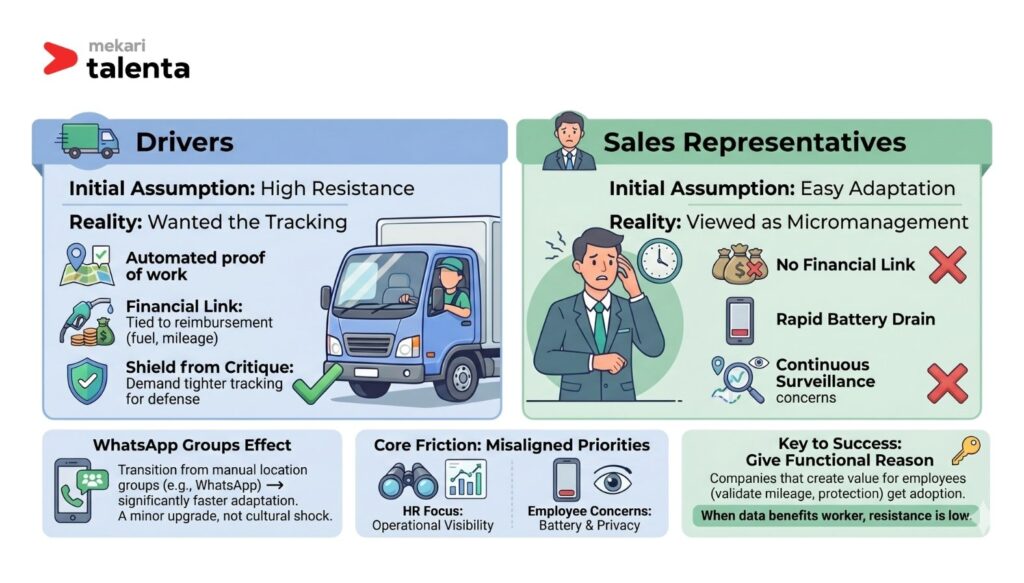
The core friction lay in a misalignment of priorities. While HR focused entirely on high-level operational visibility, employees were deeply worried about rapid phone battery drain and continuous personal surveillance.
In fact, in teams where the tracking data directly benefited the worker, such as validating mileage or protecting field staff from false client accusations of missing an appointment, resistance was virtually non-existent.
Some staff members even demanded tighter tracking parameters to shield themselves from unfair performance critiques within their objective performance appraisal framework.
This shows that field tracking must be mapped out natively alongside a centralized KPI management system so that field workers see technology as an advocate for their benefits rather than a tool for raw surveillance.
Ultimately, the companies that extracted real operational value from Live Tracking weren’t the ones who used it to monitor the hardest. They were the ones who gave their employees a functional reason to want to be tracked.
Why HR Misdiagnoses This
We assumed HR would notice tracking gaps immediately. In fact, it was that most HR teams assumed the dashboard was working perfectly as long as the status indicators remained green.
When live tracking data goes missing, human resource departments almost always misdiagnose the root cause. They instinctively attribute empty maps to technical GPS glitches, server latency, or hardware failures.
The issue is systemic: the high-level “Active” badge on the administrative console creates an illusion of performance.
An “Active” status simply means an employee is assigned to a tracking policy and is currently clocked into their shift; it does not guarantee that location data is actively streaming.
To fix this, organizations must implement seamless HRIS integration practices that securely bind biometric clock-in parameters, runtime background workflows, and live coordinate payloads into a unified data architecture rather than relying on siloed data lines.
Because teams rely heavily on these surface-level adoption metrics, they rarely audit actual route quality, such as checking for precise waypoint intervals or recorded client stops, until an operational crisis forces them to look closer.
In a real case scenario, one HR manager noted that her tracking panel flagged 8 out of 10 field agents as completely “active.” She closed the browser tab, confident that data was accumulating smoothly. Three weeks later, a heated fuel reimbursement dispute arose with a senior agent.
When she finally dug into the historical maps, six of those eight active profiles displayed nothing but a flat, straight line extending from the central office:
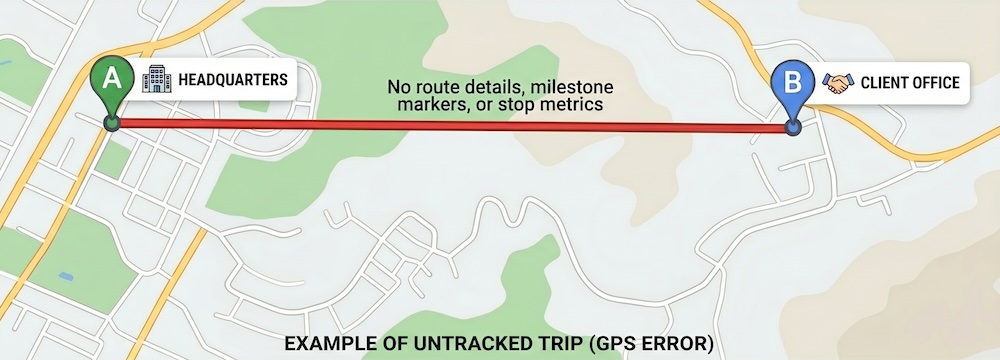
There was no route detail, no milestone markers, and no stop metrics. The field staff had been labeled as active but remained completely untracked for nearly a month.
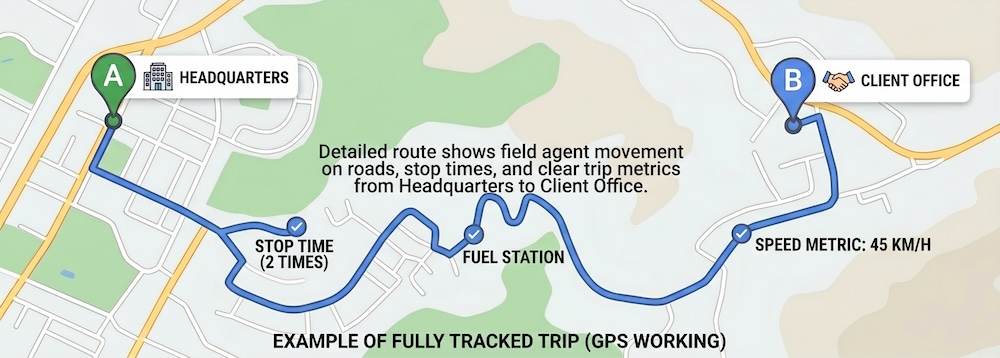
Active status is fundamentally different from tracked status. Unfortunately, most HR teams discover this distinction far too late.
What We Were Wrong About
At first, we assumed that complex technical limitations and hardware constraints would dominate our user feedback loops.
The reality was that the feature lived or died based on what happened on the employee’s screen during the very first 30 seconds of setup.
This trial served as a sobering internal retrospective for our product team. We initially believed that building a more sophisticated, visually rich manager dashboard would solve the bulk of our user complaints.
We were wrong. The real bottleneck wasn’t our backend map rendering; it was the micro-friction of a single smartphone permission toggle that we failed to account for.
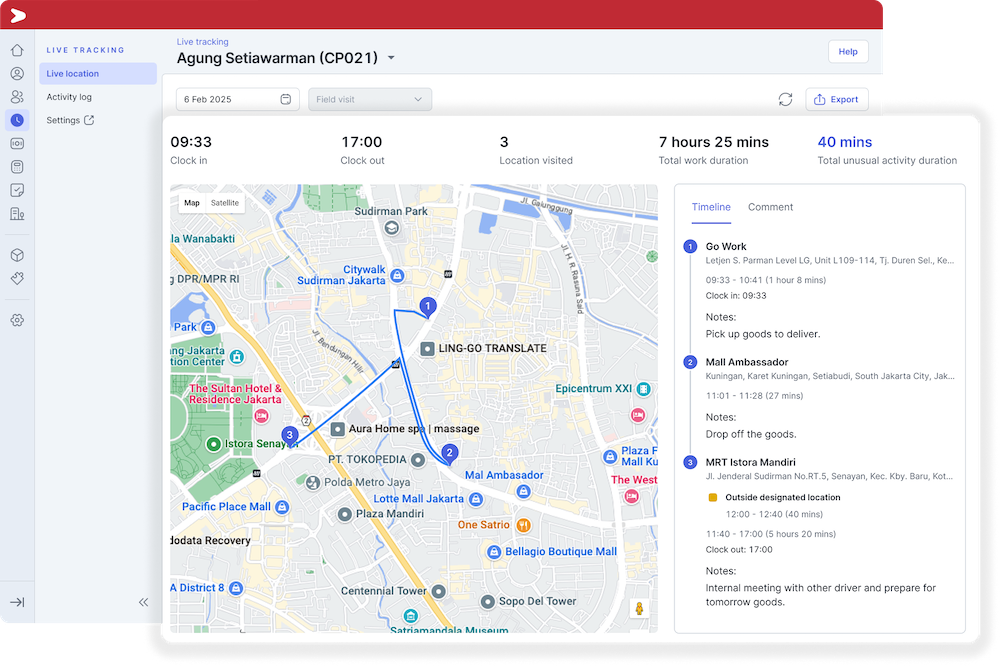
Furthermore, we falsely assumed that companies experiencing low data coverage would easily self-identify their own onboarding and socialization gaps.
Instead, because our interface dashboard looked healthy on the surface, companies didn’t realize they had an onboarding problem at all.
Navigating the highly populated HRIS landscape in Indonesia reveals that while many modern systems provide visually rich administrative dashboards, the platforms that deliver the highest long-term ROI are those that actively help operations audit actual data payloads rather than just displaying surface-level vanity status indicators.
We evaluated success by measuring “employees assigned” rather than validating actual, usable data payloads. Admitting these imperfections is uncomfortable, but acknowledging and optimizing it is the only way to build a system that actually functions in the real world.
Read more: What Is Learning & Development (L&D)? Example Programs & Strategy
What Actually Made It Work
At first, we thought that maximizing tracking coverage required strict corporate mandates and heavy compliance enforcement.
In fact, that success belonged entirely to companies that treated the rollout as a transparent change management initiative rather than a top-down software deployment.
1. Socializing the Operational “Why” Before Assignment
Companies that achieved near-perfect coverage rates consistently sat down with their teams before flipping the software switch.
They explicitly communicated why the location data was required, exactly how it would be utilized to streamline field routing, and critically, where the monitoring boundaries ended.
Organizations that skipped this open dialogue and simply pushed a surprise app update faced the highest rates of behavioral bypass and device manipulation.
2. Validating Device Configurations During Onboarding
Instead of launching the feature remotely and attempting to fix tracking gaps retroactively, successful operations validated smartphone configurations, layout-by-layout, during team onboarding.
Ensuring that employees selected “Always Allow” rather than the restrictive “Allow Once” option during the first thirty seconds of setup protected workers from prompt fatigue. This upfront alignment dramatically reduced missing routes later on.
3. Deploying with Highly Incentivized Cohorts First
Rather than enforcing a sweeping company-wide rollout aimed at monitoring basic clock-in behavior, successful managers launched trials with teams that stood to gain the most from location transparency.
They prioritized logistics drivers over compliance-focused office staff. Starting with willing groups who already understood the operational value of mapping, the tool was normalized and dissolved peer-to-peer resistance.
4. Tying Route Data to Employee Benefits
Tracking coverage skyrocketed the moment companies shifted the narrative from corporate surveillance to physical worker support.
When field staff realized the automated route data was being utilized to instantly validate their employee benefits claim, such as fuel reimbursement, and shield them against unfair client performance accusations, they actively kept their phones’ hardware GPS enabled.
5. Empowering Direct Line Supervisors
Field visibility improved significantly when dashboard access was decentralized away from a distant corporate HR department and handed to local line supervisors.
Employees who knew their immediate project manager was monitoring the route map for daily dispatch adjustments felt a localized sense of accountability to someone they interacted with daily, making them far less likely to subvert the system.
Closing
Live tracking adoption is fundamentally less of a product functionality problem and more of a human change management challenge.
The organizations that extracted immense operational value from this trial weren’t the ones with the highest number of employees blindly assigned; they were the ones who spent twenty minutes explaining the system to their workforce first.
If you are ready to build a transparent, high-coverage field workflow for your mobile team, explore our Mekari Talenta Live Tracking feature page or connect with our regional implementation specialists at Mekari Talenta via Mekari Talenta contact portal to design your rollout strategy today.
Reference:
Emerald – Evidence-based HRM / Emerald Publishing Structural Equation Modeling Study (2026)
Concur – SAP Concur Field Operations & Travel Expense Benchmarks
Research Gate – Workplace Surveillance and Its Psychological Impacts of on Employee: A Review
FAQ
1. Why did the live tracking feature fail to collect data even when the HR dashboard showed a green "Active" status?
1. Why did the live tracking feature fail to collect data even when the HR dashboard showed a green "Active" status?
The “Active” badge on the administrative console only indicates that an employee is assigned to a tracking policy and has clocked into their shift; it does not guarantee that location data is actively streaming. During the experiment, employees frequently bypassed the system by tapping “Deny” on permission prompts or turning off their phone’s hardware GPS immediately after clocking in. Because the app’s initial compliance check passed, the system falsely assured HR that tracking was functioning perfectly, rendering empty payloads or glitched, straight-line metrics on the map.
2. What are the two distinct behavioral failure modes that render tracking blind?
2. What are the two distinct behavioral failure modes that render tracking blind?
The data from the 57-company trial showed that tracking gaps are caused by human behavior rather than software bugs, splitting into two distinct modes:
-
Permission Failure: This occurs right at the device level. Employees select “Allow Once” due to prompt fatigue. The app is then forced to re-request access every time it wakes up, frustrating users—especially less tech-savvy ones—into permanently denying permission just to stop the interruptions.
-
Behavioral Bypass: Employees comply with rules at the office by enabling location tracking during morning clock-in, but immediately disable their phone’s hardware GPS once out of sight. The system then draws blind, flat, straight lines from the office checkpoint to the last known coordinate.
3. Why did logistics drivers welcome live tracking while field sales teams heavily resisted it?
3. Why did logistics drivers welcome live tracking while field sales teams heavily resisted it?
It all comes down to a misalignment of incentives. Field drivers actively wanted the tracking turned on because their operational metrics were tied directly to rigid fuel and mileage reimbursement structures; the map served as undeniable, automated proof of their real-world work.
Sales teams, conversely, shared no such financial link to the tracking data. Without a functional benefit, they viewed the automated tracking tool purely as a tool for micromanagement and invasive surveillance.
4. How does automated backend tracking differ behaviorally from legacy workarounds like WhatsApp Live Location?
4. How does automated backend tracking differ behaviorally from legacy workarounds like WhatsApp Live Location?
Legacy workarounds like temporary WhatsApp shares felt far less threatening to field staff because they carried an implicit, visible countdown timer. Employees knew the tracking would automatically expire after a client visit.
Mekari Talenta’s automated backend tracking felt completely open-ended and boundless by comparison. This lack of clear boundaries triggered a “constantly watched” psychological response, driving employees to actively toggle their hardware settings off to protect their privacy.
5. What change management steps can a company take to ensure high tracking adoption?
5. What change management steps can a company take to ensure high tracking adoption?
The trial proved that strict mandates fail, while transparent change management succeeds. Highly successful companies utilized five core strategies:
Socialize the “Why”: Communicate exactly why location data is required and define where corporate monitoring boundaries end before activating the feature.
-
Validate Configurations Upfront: Check employee device settings during onboarding to ensure they select “Always Allow” instead of “Allow Once,” eliminating prompt fatigue.
-
Deploy to Incentivized Cohorts First: Launch the tool with teams who stand to gain the most (like logistics drivers) to normalize the software and reduce peer resistance.
-
Tie Maps to Benefits: Turn the narrative from surveillance to support by using the automated data to instantly validate fuel claims or shield workers from unfair client complaints.
-
Empower Line Supervisors: Hand dashboard access to immediate project managers. Localized accountability makes employees far less likely to manipulate their settings.


