




- Cloud HRIS usually runs on a subscription model, with maintenance handled by the provider and easier scaling
- On-premise HRIS typically requires higher upfront investment, offers deeper control, and depends on internal IT ownership
- If you’re leaning toward a cloud option, Mekari Talenta is worth considering for SMEs and large enterprises
Cloud-based HRIS vs on-premise explained. Compare costs, security, data control, scalability, and access to choose the right model for your business.
One of the systems that plays a crucial role in HR work in every company is the Human Resource Information System (HRIS).
HRIS—whether cloud-based or on-premise—serves to collect, store, archive, and analyze HR-related data, such as payroll, attendance, bonuses, and more.
As technological disruption pushes businesses further into the digital world and demands processes that are more flexible and dynamic, choosing the right HRIS deployment model becomes increasingly important, especially for organizations that want technology foundations capable of supporting long-term strategic workforce planning.
In this context, understanding the differences between cloud-based HRIS and on-premise HRIS is key to ensuring data accuracy, performance visibility, and smoother HR operations.
Read also: How to Choose the Right HRIS Vendor: A Practical HR Guide
What Is an HRIS?
An HRIS (Human Resource Information System) is a software system that helps HR teams manage, centralize, and use employee data to run day-to-day HR processes more efficiently.
In practice, an HRIS functions as a single source of truth for HR-related information, covering areas like employee records, payroll, attendance and leave, benefits, bonuses, performance tracking, and reporting.
By organizing HR data in one place, it helps reduce manual work, improve data accuracy, and support better decision-making through dashboards and HR analytics.
Today, HRIS is also increasingly expected to support faster workflows, remote access, integrations with other business tools, and stronger compliance controls as companies move toward more flexible, digital operations.
Read also: 10 Enterprise HRIS Software to Increase Operational Efficiency by 40%
What Is On-Premise HRIS Software and Cloud-based HRIS?
Before choosing an HRIS, it’s important to understand how it can be deployed.
Before choosing an HRIS, it’s important to understand how it can be deployed. The two most common options are on-premise HRIS and cloud-based HRIS, each with different levels of control, responsibility, and flexibility.
What Is On-Premise HRIS?
On-premise HRIS is software that is built and deployed outside the software provider’s infrastructure.
Typically, on-premise deployment is adopted by more conventional companies. The procurement and setup of both infrastructure and software are handled by the company itself, covering everything from servers and software development to maintenance.
This allows the company to easily control the databases, customize the system according to its needs, and more.
Core Components of On-Premise HRIS
- In-house infrastructure: Physical or virtual servers, storage, and networking equipment managed by the company.
- Internal IT ownership: Teams responsible for installation, configuration, updates, and troubleshooting.
- Security and access controls: Policies, monitoring, and compliance measures managed internally.
- Backup and disaster recovery: Company-managed backup schedules, redundancy, and recovery planning.
- Customization and integrations: Custom development and integration work based on company requirements.
What Is Cloud-based HRIS?
Cloud-based HRIS is a system built on cloud infrastructure, enabling remote access and operation for users as long as they have an internet connection.
With cloud-based HRIS—often delivered as Software-as-a-Service (SaaS)—the company acts as a user and does not manage or control the underlying infrastructure where the application runs.
In practice, the company simply logs in to the software, and all data is stored in the cloud environment provided by the vendor.
With this model, companies also do not need to procure infrastructure or hire a dedicated IT team for server and software management, since maintenance, updates, and configurations are handled directly by the provider.
Core Components of Cloud-based HRIS
- Vendor-managed cloud infrastructure: Hosting, storage, scaling, and reliability handled by the provider.
- Subscription-based access: Typically monthly or annual plans based on company needs.
- Automatic updates and maintenance: Regular improvements, patches, and system upgrades managed by the vendor.
- Remote accessibility: Web-based access across devices with internet connectivity.
- Built-in security standards: Encryption, monitoring, and compliance controls provided as part of the service.
- Integrations and APIs: Connects with payroll, accounting, attendance devices, and other HR/business tools.
Read also: 5 Benefits of Using Online HR System
The Difference between Cloud-based HRIS vs On Premise Software
Here’s a clear comparison of cloud-based HRIS and on-premise HRIS based on what we’ve explained above:
| Aspect | On-Premise HRIS | Cloud-based HRIS (SaaS) |
| Where it runs | Deployed outside the vendor’s infrastructure (hosted on the company’s own environment). | Runs on the vendor’s cloud infrastructure. |
| Infrastructure ownership | Company-owned/managed servers, storage, networking. | Vendor-managed hosting, storage, scaling, reliability. |
| Setup & implementation | Company handles procurement and setup (servers, installation, configuration, development). | Company typically just configures the system; vendor provides the platform. |
| IT responsibility | Heavy: internal IT handles installation, updates, troubleshooting. | Light: vendor handles maintenance, patches, upgrades. |
| Data storage location | Stored in company-managed databases/servers. | Stored in vendor-provided cloud environment. |
| Control over system & data | High control: full control of databases and implementation choices. | Limited infrastructure control: company is a user; control is mostly at app/config level. |
| Customization | Often more flexible for deep customization (depends on internal capability). | Usually configurable with standard options; customization depends on vendor and APIs. |
| Updates & maintenance | Company must plan and execute upgrades and maintenance. | Automatic updates and continuous improvements by the vendor. |
| Backup & disaster recovery | Company designs and manages backup, redundancy, recovery plans. | Vendor typically provides built-in backup/recovery as part of service. |
| Security management | Managed internally (policies, monitoring, compliance controls). | Vendor provides built-in security standards (e.g., encryption, monitoring), with access control managed by the company. |
| Accessibility | Often limited to specific devices/networks where it’s installed/accessible. | Accessible remotely across devices via internet connection. |
| Integrations | Custom integration work handled by internal team/partners. | Integrations and APIs commonly available to connect with other tools. |
| Cost structure (typical) | Higher upfront costs (infrastructure + build/setup), plus ongoing maintenance costs. | Subscription-based (monthly/annual), predictable operating cost. |
Key Considerations When Choosing Cloud-based vs On-Premise HRIS
After understanding what cloud-based and on-premise HRIS are, the next step is deciding which model fits your company best.
The right choice usually depends less on features (most HRIS cover similar core functions) and more on operational needs, such as budget structure, IT capacity, data governance, scalability, and how your teams work day to day.
Below are the most common decision-making factors companies use when comparing both deployment types.
| Decision Factor | On-Premise HRIS | Cloud-based HRIS (SaaS) |
| Costs required | High upfront investment + ongoing maintenance costs | Lower upfront cost, subscription-based (monthly/annual) |
| Cost risk | Higher financial risk early on (capex-heavy) | Lower early risk, more predictable spending (opex) |
| Data storage | Stored in company-managed servers (more direct control) | Stored in vendor cloud (vendor-managed environment) |
| Security ownership | Fully internal responsibility (policies, monitoring, resources) | Vendor provides standardized security; company manages access/roles |
| Scalability | Requires server/infrastructure expansion as you grow | Easier scaling via vendor infrastructure |
| Access | Often limited to installed devices/internal network | Remote access from anywhere with internet |
1. Costs Required
Many companies still view an on-premise HRIS as an important investment because it offers strong security, autonomous data control, and full control over any implementation they want to carry out.
However, company executives should also recognize that choosing on-premise software comes with significant financial risk, since most of the investment must be made upfront.
When you choose cloud-based software, the costs are usually not as high as on-premise software.
In most cases, you only pay a monthly or annual subscription fee based on what your company needs.
The amount is generally far lower than the upfront investment required for on-premise software, reducing the risk of large initial spending.
Choosing on-premise software also means bearing all maintenance risks required while the application is being used.
If the selected server or infrastructure capacity is insufficient, the company must add servers with larger storage capacity.
This can impact the existing system, increasing the risk that the company may need to overhaul the entire infrastructure. For companies experiencing rapid growth, on-premise deployment may not be the best option.
This is different from cloud-based software/SaaS. With SaaS, the company acts only as a user. This means the company is not responsible for upgrades and server maintenance that may be needed at any time to ensure the application runs smoothly.
It’s also worth noting that building an on-premise system is typically categorized as a capital expense (capex), while using cloud-based HRIS services is considered an operational expense (opex), which may result in different tax treatment.
Key takeaways:
- Cloud-based HRIS is suitable if your company wants lower upfront costs, prefers predictable subscription spending (opex), and wants to avoid unexpected infrastructure/maintenance expenses as the business scales.
- On-premise HRIS is suitable if your company is comfortable with large upfront investment (capex) and is ready to fund ongoing maintenance, upgrades, and potential server expansion internally.
2. Cost Risk
On-premise can carry bigger financial risk because the investment happens early, and future needs (capacity upgrades, maintenance, overhaul) can increase costs over time.
Cloud shifts many of these risks to the provider, making costs more predictable, especially when the company grows.
Key takeaways:
- Cloud-based HRIS is suitable if your company wants predictable budgeting and to reduce surprise costs from upgrades/maintenance.
- On-premise HRIS is suitable if your company accepts capex + long-term maintenance risk, and has clear long-term forecasting for infrastructure needs.
3. Data Storage
In terms of data storage, on-premise software can feel more secure because it uses its own internal storage system, meaning all company data can be stored in a more controlled environment.
However, a company’s storage capacity is usually limited, which may require purchasing significant additional storage or deleting less important data.
It’s also important to understand that security in an on-premise setup can be a double-edged sword.
On one hand, company data may be safe because it is stored in databases and servers managed internally.
On the other hand, if the company does not have a dedicated team to maintain security, this can create vulnerabilities that may expose the system to security risks at any time.
Meanwhile, cloud-based HRIS software offers more convenience because you don’t need to manually manage company data storage. Everything is stored securely and can only be accessed by authorized users.
When choosing a cloud-based HRIS service, data management and an NDA (non-disclosure agreement) are two things that should be carefully considered.
That said, some SaaS providers like Mekari Talenta ensure data is stored securely in standardized systems.
You also don’t need to worry if there is an issue with a device, because the data will remain safely stored.
In addition, cloud-based HRIS software typically ensures that all stored data is securely encrypted.
Depending on the provider, your data may be automatically deleted if you stop subscribing. However, some providers may still retain the data even after you end your subscription.
Key takeaways:
- Cloud-based HRIS is suitable if your company wants simpler storage management and can align with vendor terms like NDA, retention, and governance.
- On-premise HRIS is suitable if your company needs data stored and managed internally for stricter internal requirements.
4. Security Ownership
With on-premise, security is largely the company’s responsibility, including policies, monitoring, patching, and incident response. This can be strong if you have a mature IT/security team, but risky if you don’t.
Cloud providers usually offer standardized security measures (e.g., encryption, monitoring), while the company still manages access controls, roles, and internal policies.
Key takeaways:
- Cloud-based HRIS is suitable if your company wants vendor-provided security standards and prefers not to manage security infrastructure internally.
- On-premise HRIS is suitable if your company requires full security control and has a dedicated team to manage it end-to-end.
5. Scalability
On-premise scalability depends on your infrastructure. If you grow quickly, you may need to add servers or storage, which can impact the existing system and increase complexity.
Cloud-based HRIS is typically easier to scale because the vendor manages infrastructure expansion.
Key takeaways:
- Cloud-based HRIS is suitable if your company expects rapid growth (headcount, locations, data volume) and needs easy scaling.
- On-premise HRIS is suitable if your company growth is stable and predictable, and infrastructure planning is not a major concern.
6. Access to the Software
Ease of access is one of the key factors to consider when choosing software. With on-premise software, you can usually access the system only on specific devices where the software has been installed.
In contrast, with cloud-based HRIS software, you can access all your work within the system anytime and anywhere, and from any device, as long as you are connected to the internet.
Key takeaways:
- Cloud-based HRIS is suitable if your company supports hybrid/remote work and needs multi-device, anytime access. For organizations operating across locations, this model functions as an effective HRIS for hybrid workforce management.
- On-premise HRIS is suitable if your company wants restricted access limited to certain devices or internal networks.
Read also: Best Cloud HCM Software: Top Solutions for Modern Workforce Management
Mekari Talenta, Best Cloud-Based HRIS Recommendation for SMEs & Large Enterprises
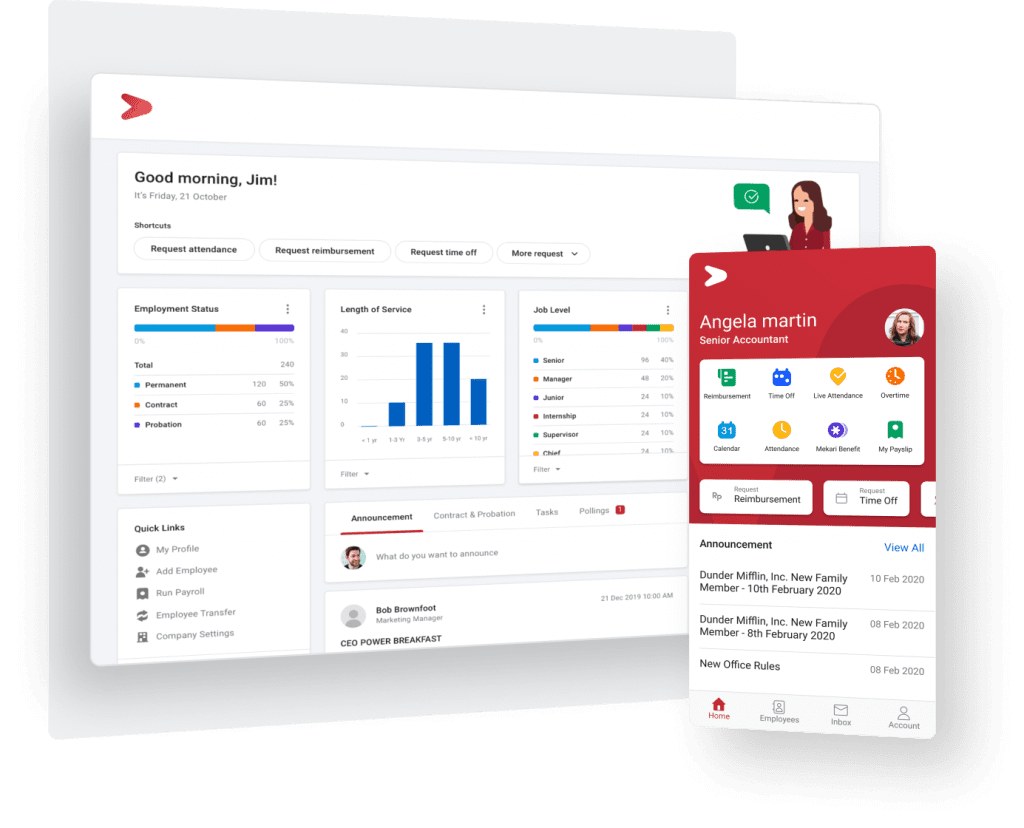
If you’re leaning toward a cloud-based HRIS, Mekari Talenta is a strong option for both SMEs and large enterprises that want to modernize HR operations without the overhead of managing servers, upgrades, and maintenance internally.
Built as a secure, cloud-based HRIS, Mekari Talenta helps HR teams move away from manual, paper-based workflows and manage core HR processes in one integrated platform, from employee database management to recruitment workflows.
Because it’s cloud-based, teams can access HR data anytime and anywhere, across devices (desktop and mobile), while keeping information centralized and organized.
Mekari Talenta also supports smoother collaboration by helping companies reduce miscommunication through structured flows for information, approvals, and tasks.
Plus, it enables more efficient hiring by helping automate end-to-end recruitment processes, so nothing gets missed from recruitment to onboarding and even offboarding.
For day-to-day operations, features like integrated digital forms (onboarding forms, employee surveys, and more) simplify data collection, reduce errors, and keep employee records consistently updated.
Why companies choose Mekari Talenta?
- Online access to HR data with cloud storage built on international security standards
- Integrated HR workflows to reduce miscommunication and speed up approvals
- Recruitment automation to streamline processes and reduce reliance on physical documents
- Digital forms integrated with employee database for faster, cleaner data collection
- Flexible access via web and mobile apps (iOS/Android)
Ready to simplify HR operations with a secure cloud-based HRIS software?
Try Mekari Talenta to manage employee data, approvals, and recruitment workflows in one platform—accessible anywhere, anytime.
Talk to our sales team to get a tailored walkthrough and see how Mekari Talenta can fit your company’s needs, whether you’re scaling an SME team or managing enterprise-level complexity.