
Human Resource Management System (HRMS): Guide for Singapore Employers

- An HRMS is a digital system that centralises employee information and core HR processes in one platform.
- An HRMS helps automate routine HR tasks, connect workflows, and make employee data easier to manage and use.
Singapore’s HR function is already relatively exposed to HR technology.
Access, however, does not automatically translate into digitalisation.
In smaller organisations, the pressure compounds. HR responsibilities are often concentrated in one person, or bundled into a role that also covers finance, admin, or office operations.
Which leads to a practical question: how does a small team spend less time managing repetitive processes and more time supporting workforce and business priorities? This is where an HRMS becomes relevant.
This guide explains what an HRMS is, what it helps manage, which processes it can automate, and what to consider when evaluating one.
What Is a Human Resource Management System (HRMS)?
A Human Resource Management System (HRMS) is a digital system that centralises employee information and supports the management, automation, and administration of core HR processes. It is the system of record that everything else connects back to.
An HRMS typically combines employee data management with workflows for payroll, attendance, leave, recruitment, onboarding, performance, reporting, and employee self-service.
The main purpose is to create a more connected way of managing the employee lifecycle. Instead of maintaining separate spreadsheets or systems for individual processes, HR can manage related information through a central platform.
An HRMS typically includes:
- HRIS capabilities, such as employee data, benefits administration, payroll, time and attendance, reporting, analytics, and employee self-service
- Recruitment and applicant tracking
- Onboarding and offboarding
- Performance management
- Employee engagement and development
HRIS vs HRMS vs HCM: What’s the Difference?
The terms HRIS, HRMS, and HCM are often used interchangeably, but they can describe different levels of functionality.
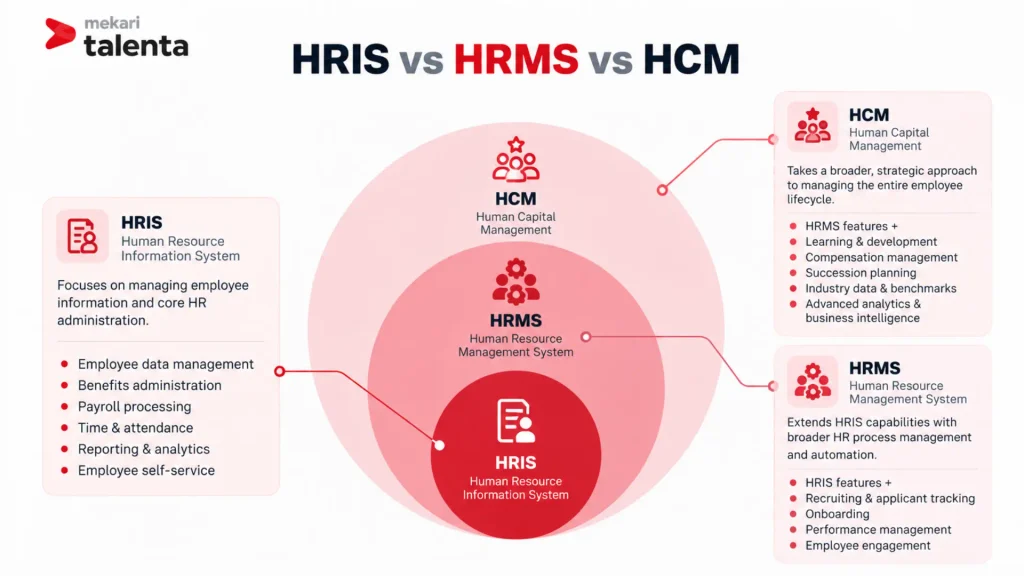
The key difference lies in how far each system extends beyond core HR administration. HRIS focuses on maintaining employee information and essential HR processes, while HRMS adds broader HR workflows and automation.
HCM extends further into talent development, compensation, succession planning, and strategic workforce insights.
Why Organisations in Singapore Are Investing in HRMS?
The reasons tend to cluster around three problems: administrative load, fragmentation, and the difficulty of getting usable workforce data out of either.
To Reduce the Administrative Workload of Lean Teams
The IHRP and Mercer report points to automation and process simplification as the way to release that capacity.
For a small team, an HRMS automates repetitive processes and centralises HR information, which reduces administrative work and creates room for core and strategic activity.
The report’s diamond-shaped model describes the target allocation as 20% administrative, 60% core, and 20% strategic.
To Replace Fragmented Processes With One Integrated System
As HR processes grow more complex, managing employee information across separate tools, spreadsheets, and systems can make consistent data and reporting harder to maintain.
This becomes particularly relevant as organisations expand across markets.
The same research found that Singapore-based organisations were increasingly hiring internationally, adding further complexity around payroll, compliance, and workforce management.
To Make Workforce Data More Useful for Decision-Making
Another reason to invest is the gap between having HR data and using it effectively.
An HRMS can provide a central source of workforce information for monitoring headcount, turnover, attendance, payroll costs, and other workforce indicators.
What HR Processes Can an HRMS Automate?
An HRMS can support automation across multiple stages of the employee lifecycle, including:
- Payroll and compensation: payroll processing, salary calculations, CPF-related payroll processes, payslips, payroll records, reporting, and payroll data integration
- Employee records and HR administration: a centralised employee database, employee documents, employment and personal information, job information, employee status, and HR documentation
- Leave and attendance management: leave applications, approval workflows, leave balances, attendance records, working hours, overtime, and attendance reporting
- Recruitment and onboarding: recruitment workflows, candidate information, onboarding tasks, and transfer of candidate data into employee records
- Performance management: goals, review cycles, manager feedback, performance records, and development plans
- HR reporting and workforce analytics: headcount, turnover, absence, workforce trends, payroll costs, workforce planning, and HR KPIs
The Reality of Adoption Today: Most Have Invested, but Not Optimally
Singapore has relatively high adoption of HR technology.
This gap suggests that having access to HR technology does not necessarily mean that HR processes are fully digitalised.
Digital support also varies across functions, with higher support in HR Operations, Performance Management, and Compensation & Benefits, while Talent Management and Strategic Workforce Planning remain less digitally supported.
The challenge is therefore shifting from simply adopting HR technology to using it effectively across the HR function. An HRMS can provide the foundation for connecting processes, centralising workforce information, and extending digitalisation beyond routine administration.
What Should Singapore Employers Look for in an HRMS?
The right HRMS should solve practical operational problems while providing enough flexibility to support future growth.
1. Centralised Employee Data
A reliable HRMS should give HR one centralised employee record instead of relying on multiple spreadsheets and systems. This creates a consistent source of employee information across payroll, reporting, attendance, and other HR processes.
2. Payroll and Local Payroll Support
Payroll should be one of the first capabilities to evaluate because payroll accuracy and compliance become more important as headcount grows.
Look for Singapore payroll capabilities, CPF-related workflows, payroll calculations, payslips, payroll reporting, and integration with employee information.
3. Leave and Attendance
Leave and attendance can generate a significant amount of repetitive administration when managed manually.
Check whether the system supports automated leave calculations, attendance tracking, approval workflows, working-hour records, and employee self-service.
4. Workflow Automation
Look for an HRMS that can automate recurring workflows through predefined approval paths, so routine processes do not depend on manual follow-ups.
This is particularly useful for processes involving multiple approvals, information requests, or document submissions, helping reduce administrative intervention and keep HR workflows moving efficiently.
5. Reporting and Workforce Analytics
An HRMS should make workforce information easier to access and interpret. Look for real-time dashboards, custom reports, workforce metrics, payroll reporting, headcount analysis, and data export or API capabilities.
Integrated HR data can also support more accurate workforce planning and talent decisions.
6. Integration Capabilities
Integration matters more as the organisation grows. Check whether the HRMS connects to payroll, accounting, finance, recruitment, learning, and other business systems.
The underlying principle is simple: avoid creating another HR data silo while trying to remove one.
7. Scalability
An HRMS should accommodate changes in headcount, organisational structure, and operating model.
Consider whether it can support growing teams, multiple locations, different employment arrangements, and regional expansion without requiring a complete system replacement.
8. Employee Self-Service
Self-service matters disproportionately for a small team, because it removes routine requests from the queue entirely. Leave applications, payslips, employee information, HR requests, and documents can all sit with employees rather than HR.
Read also: 10 Best HR Software in Singapore to Reduce 30% Administrative Costs
How to Choose the Right HRMS for Your Organization
The right system depends on company size, current HR setup, payroll complexity, and how quickly the workforce is growing. For smaller and growing organisations, the priority is usually replacing manual work without introducing unnecessary complexity.
As the workforce grows, stronger payroll, workforce management, recruitment, and talent capabilities tend to become necessary.
1. Start With Company Size and HR Complexity
Rather than choosing based on the number of features, consider what the current workforce actually requires.
| Company Situation | What to Look For |
|---|---|
| Small team with simple HR needs | Employee database, leave, attendance, payroll, payslips, employee self-service |
| Growing company with 50–200 employees | Broader automation, multi-level approvals, attendance and payroll management, reporting, recruitment |
| Multi-branch or regional team | Multi-branch management, country-specific payroll, centralised workforce data, multi-currency capabilities |
| Growing talent function | Recruitment, performance management, competency management, succession planning, learning |
2. Check Whether You Need One Platform or Several Point Solutions
If HR currently runs on spreadsheets, email, a separate attendance tool, and standalone payroll software, the real cost is in moving data between them. That movement is invisible on an invoice but very visible in a month-end close.
Consider whether the HRMS can centralise employee data, connect attendance, leave, and payroll, support onboarding and offboarding, reduce duplicate entry, produce HR reporting from the same data, and integrate with other systems through an API.
3. Match the Payroll Setup to the Business
Payroll should be one of the first capabilities to evaluate because payroll errors and compliance are identified as key pain points for the target SMB segment.
Consider Singapore payroll and CPF calculation, payroll reporting, payslips, statutory employee information, and whether payroll and employee data are managed within the same system.
4. Choose the Package Based on What You Need Now
An HRMS does not need to be complicated from day one. Start with the processes creating the most administrative work, then expand as needs grow.
For a team focused on HR operations, look for a package covering employee administration, attendance, leave, payroll, claims, reporting, and employee self-service.
For a team starting to build out a talent function, consider whether the platform can extend into recruitment, performance, competency management, development, and succession planning without a separate system.
5. Consider the Total Cost of Consolidation
Price is best evaluated against the number of processes and tools the HRMS replaces, not on a per-seat figure in isolation.
Weigh per-employee software cost, additional module or add-on costs, implementation and migration effort, the number of separate tools that can be consolidated, time saved on manual administration, and whether modules can be added later.
6. Think About Where the HR Function Is Heading
The best-fit system should solve today’s administrative problems while leaving room to scale. That usually means a path from manual HR to centralised HR to more data-driven HR.
Evaluate whether the platform can grow across that path: HR administration, then payroll and workforce management, then recruitment, then performance and talent development, then HR insights.
Read also: A Guide to Choosing HR Software in Singapore for Business Scalability
Build a Smarter HR Function With Mekari Talenta
Managing HR across spreadsheets, disconnected tools, and manual workflows can become increasingly difficult as your workforce grows.
Mekari Talenta brings HR administration, payroll, attendance, recruitment, talent management, and workforce insights into one integrated platform, with capabilities designed for Singapore operations.
With Singapore-specific payroll capabilities including CPF calculation, alongside multi-branch management, employee self-service, AI-powered HR features, and talent development tools, Mekari Talenta helps reduce administrative work while giving your organisation greater visibility across the employee lifecycle.
Ready to streamline your HR operations with a more connected approach? Book a demo to experience firsthand how Mekari Talenta can streamline your HR operations, from payroll and workforce management to talent development, in one integrated platform.
Frequently Asked Questions (FAQs)
How long does it take to implement an HRMS?
How long does it take to implement an HRMS?
Implementation time depends on the number of employees, HR processes, data volume, and integrations involved. A basic setup can be relatively quick, while more complex implementations may require additional time for data migration, workflow configuration, and testing. A clear implementation plan can help minimise disruption to ongoing HR operations.
How should existing employee data be migrated into an HRMS?
How should existing employee data be migrated into an HRMS?
Start by reviewing and cleaning existing employee records before importing them into the new system. Remove duplicates, standardise fields, and verify information such as employee details, employment status, salary data, and leave balances. The migration process should also include data validation to ensure records remain accurate after transfer.
Is an HRMS suitable for companies that already use accounting or payroll software?
Is an HRMS suitable for companies that already use accounting or payroll software?
Yes, an HRMS can complement existing systems when the two platforms can exchange relevant data. Integration can reduce duplicate data entry and help keep employee, payroll, and financial information aligned. The key is to determine which system should serve as the primary source for each type of data.
How can companies encourage employees to use a new HRMS?
How can companies encourage employees to use a new HRMS?
Employee adoption is easier when the system simplifies tasks employees already perform, such as checking payslips, submitting leave requests, or updating personal information. Provide clear guidance and introduce the most relevant self-service features first rather than requiring employees to learn the entire platform at once. Usage can then be monitored to identify processes that may need additional support.
What security considerations should be evaluated when selecting an HRMS?
What security considerations should be evaluated when selecting an HRMS?
An HRMS handles sensitive information such as employee identities, salaries, attendance records, and employment documents, so data security should be part of the evaluation. Review access controls, user permissions, authentication, data protection, audit trails, and the provider’s approach to backups and security incidents. It is also important to understand where data is stored and how the provider manages access to it.
